Grade your Google listing. Live.
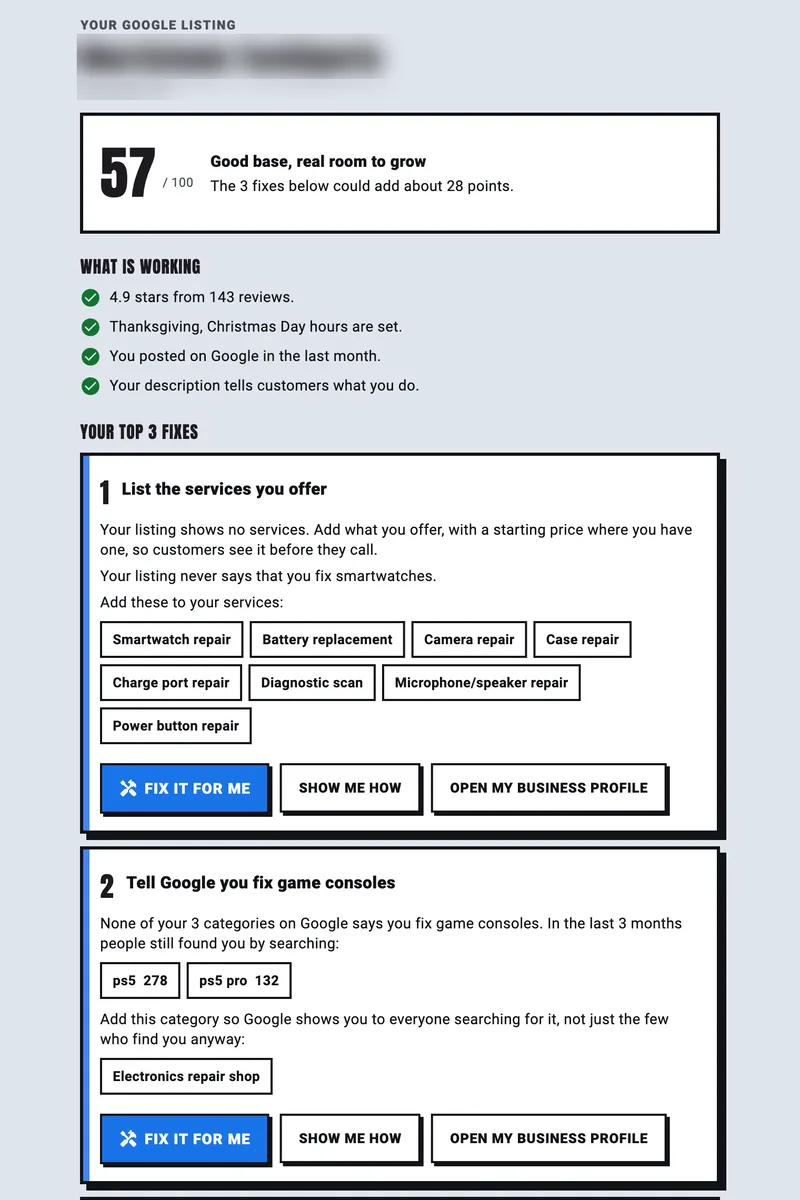
Sign in with Google and watch your listing get scored out of 100, with your top fixes and the real searches that found you. Nothing on your listing changes.
Yes, signing in lets STACKS see your Google Business Profile, and Google will warn you about that. The permission is removed the moment your report is generated.
Waiting for Google
Which listing should we grade?
Pick one. You get one report for it, live on this page.
The grade shows the fixes. Members fix them in one tap.
One-tap fixes
Approve a fix and STACKS sends it to Google. Every change is recorded and can be undone.
Review replies drafted
Every review that needs an answer comes with a reply ready to approve.
The pages Google looks for
A page for every device, repair and store, built automatically on your own domain.
Questions
What do I get?
One report for the listing you pick: your score out of 100, what is working, your top fixes with the real searches that found you, and step-by-step how-tos. It shows live on this page and lands in your inbox, so you can make each fix yourself in Google.
I am a STACKS member. What is different?
Members get this same report in the STACKS app, where every fix is one tap: approve it and STACKS sends it to Google. Your app connection stays exactly as it is.
Does this change anything on my Google listing?
No. STACKS reads your listing once and changes nothing. We never become a manager or user on your listing.
Does STACKS keep access to my Google account?
No. Our access is removed from your Google account as soon as your report is emailed. If you are already a STACKS member, your app connection stays exactly as it was, and the grade adds no new access.
What does STACKS read?
The names of the listings your account manages, so you can pick one. Then, for that listing only: its details, review count, star rating and how many reviews have a reply, the searches Google reports for the last three months, calls, website clicks and direction requests for the last 90 days, photo and video counts, and the date of your latest post. Review text is not kept.
Why the tick box?
Google's data rules ask that you agree the STACKS team may see your grade. Without that agreement no grade starts.
How do I get my record deleted?
Email yes@stacks.tech. It is deleted within 30 days.
Full detail: privacy policy, section 4.9.